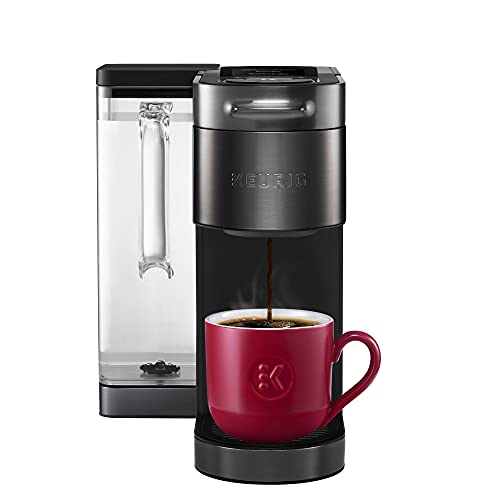
The Keurig K-Supreme Plus SMART is a single-serve K-Cup brewer that tries to take the guesswork out of pod coffee. Insert a pod and the brewer reads it, then applies the settings the roaster recommends. You can still tweak the cup size, strength and temperature yourself, save favorites in the Keurig app and start a brew by voice. It is Keurig’s more connected, more adjustable alternative to a basic pod machine.
This profile summarizes what Keurig says about the brewer and explains who it suits. We did not handle it ourselves. We read Keurig’s product page and its published guide for the related K-Supreme Plus and compared the details. For a pod machine that also brews a carafe of ground coffee, see the Hamilton Beach FlexBrew Trio profile. For a pod-free alternative with several brew sizes, see the Braun MultiServe KF9150 profile.
The Short Version
Pod brewers are popular because they are fast and tidy: one cup, no measuring, no filter to toss. The K-Supreme Plus SMART keeps that simplicity but adds adjustment. According to Keurig, it offers five strength settings, from Balanced to Intense, six temperature settings, from Brew Over Ice to Max Hot, and five cup sizes of 4, 6, 8, 10 and 12 oz. The Amazon listing title adds a 78 oz reservoir, which means fewer refills than a small brewer.
The trade-offs are the ones that come with any pod system. You are limited to pods, or a specific reusable filter, you cannot brew a pot for guests and the machine is more complex than a plain drip maker.
Key Specs According to Keurig
The following comes from Keurig’s product page for the K-Supreme Plus SMART unless noted.
- Strength: 5 settings, from Balanced to Intense.
- Temperature: 6 settings, from Brew Over Ice to Max Hot.
- Cup sizes: 5 options: 4, 6, 8, 10 and 12 oz.
- Brew Over Ice: Brews hot coffee over ice for iced drinks. Keurig says not to brew over ice in a glass cup.
- BrewID: Reads the brand and roast of the K-Cup pod and adjusts settings to the roaster’s recommendations.
- MultiStream: Uses multiple water streams to saturate the grounds more evenly than the Keurig K-Classic, according to Keurig.
- Wi-Fi: Requires a 2.4 GHz home network using WPA2-PSK. It does not support 5 GHz networks or networks that need a username, password or web page login.
- App and voice: Store and manage favorite settings in the Keurig app. Keurig says it works with Alexa and Google Home.
- Reservoir: The Amazon listing title says 78 oz, removable. The Keurig page we read did not state the size, so confirm it before you buy.
Keurig’s page lists conflicting phone requirements, with one section saying iOS 13 and Android 8 or newer and the FAQ saying iOS 11 and Android 6. If your phone is old, check the current requirement in the Keurig app store listing.
How BrewID Changes the Routine
With a basic pod brewer, you choose a size and press a button, and every pod is brewed the same way. BrewID is meant to treat a light roast differently from a dark one. Keurig says the brewer reads the pod and applies the roaster’s recommended settings. If you like not having to think about it, that is a real convenience. If you like to experiment, you can override the suggestions with the strength, temperature and size buttons or save your own favorites in the app.
There is a catch. BrewID reads the brand and roast of the pod, so it is built around Keurig K-Cup pods, and Keurig’s page does not say what happens with other pods. If you mostly buy off-brand pods, ask whether BrewID is worth paying for.
Brewing Options in Practice
The 4 to 12 oz range runs from a small espresso-style cup to a large mug. A very large travel mug will need two brews, and no setting makes a full carafe. Keurig’s guide for the related K-Supreme Plus notes that you can remove the drip tray to fit a travel mug. Check that the SMART version has the same arrangement before you rely on it for a tall tumbler.
Six temperature settings are unusual in this category. Hotter coffee tends to extract more, which some people like in a dark roast. Cooler settings suit a delicate light roast or an iced drink. Because Keurig’s page does not list exact degrees, treat the settings as relative steps, not a specification.
Brew Over Ice is aimed at iced coffee. Keurig says not to use a glass cup for it. Use a plastic tumbler with room for both the ice and the coffee.
Wi-Fi and the Keurig App
The SMART in the name refers to the Wi-Fi connection. With it, you can save settings in the app, get suggestions and use voice control through Alexa or Google Home. The Keurig page says the brewer needs a 2.4 GHz network with WPA2-PSK security. Many modern routers broadcast both 2.4 and 5 GHz. If yours combines them under a single name, you may have to separate them temporarily to pair the brewer. Hotel-style networks that require a web login will not work.
You do not need to use any of this. The buttons on the brewer still handle size, strength and temperature. If you do not care about an app, a simpler Keurig will do the same job for less, and you can compare tiers on Keurig’s site.
Reusable Filters and Maintenance
Pods are convenient, but they create more waste and cost more per cup than ground coffee. A reusable filter lets you brew your own grounds. Keurig’s guide for the related K-Supreme Plus warns that the brewer is compatible only with the newly designed Keurig My K-Cup Universal Reusable Coffee Filter and that older versions or other brands may cause damage. We read that guide, not one written for the SMART, so confirm the rule in the SMART’s own guide before you buy any filter.
Keurig’s guide also describes upkeep that is typical for the line: an automatic off 5 minutes after the last brew, a one-time cleansing brew at setup, a warning not to use distilled water and a drip tray that holds up to 8 oz of overflow. It also describes a descale notification and an exit needle you can clear with a straightened paper clip if grounds block it. Treat those as guidance for the K-Supreme Plus family and check the SMART’s guide for model-specific steps. In practice, keep the reservoir clean, empty the drip tray and descale on the schedule in the manual.
Pros and Cons
Pros
- BrewID applies the roaster’s recommended settings to K-Cup pods
- Five sizes, five strengths and six temperatures
- Over Ice setting
- App favorites plus Alexa and Google Home
- MultiStream brewing for more even saturation, according to Keurig
Cons
- Pod-only, with no way to brew a pot
- Reusable filters must be Keurig’s newer My K-Cup design
- 2.4 GHz Wi-Fi only
- BrewID is built around Keurig K-Cup pods
- Pods cost more per cup than grounds, and create more packaging waste
Who Should Buy It
The K-Supreme Plus SMART suits people who live on single cups: one or two coffee drinkers, home offices, apartments and anyone who values speed. It is also a good fit if you want to adjust strength and temperature without touching a grinder or measuring scoop. If you like a gadget with an app and saved favorites, the SMART features are the point.
It is a poor fit for large households, hosts who serve guests and anyone who wants the freshest ground coffee. For a pot on the table, look at the Hamilton Beach FlexBrew Trio, which brews both pods and a carafe, or the BUNN BT Velocity Brew, which fills a 10-cup carafe in about 4 minutes.
What to Check Before You Buy
- Pod supply: BrewID is built around Keurig K-Cup pods.
- Wi-Fi: Confirm your router offers a 2.4 GHz network.
- Reservoir: Check the size on the listing and on Keurig’s current specs.
- Reusable filter: Buy only the My K-Cup design Keurig names for your model.
- Counter space: A large reservoir makes the machine bigger, so measure the space under your cabinets.
If you are still weighing pods against other styles, our full coffee maker ranking shows where this brewer lands among the ten models we compare.
You can see current pricing and options here: Keurig K-Supreme Plus SMART on Amazon. Buying through our link may earn a commission at no cost to you.
Sources